

Linkli Ödeme Servisi
Tek kullanımlık bir Dinamik Ödeme Linki (DPL) oluşturmak için bu API kullanılır. Bu link, müşterilere ödeme yapmaları için gönderilebilir ve belirli bir süre veya kullanım limitiyle sınırlıdır.
İstek Bilgileri
- Metot:
POST - URL:
https://staging.halkode.com.tr/ccpayment/purchase/link - CANLI URL:
https://app.halkode.com.tr/ccpayment/purchase/link - Yetkilendirme:
Bearer {token}Token Alma servisinden alınan değer
İstek Parametreleri (Body)
| Parametre | Tip | Koşul | Açıklama |
|---|---|---|---|
merchant_key | string | Zorunlu | Üye işyeri anahtarı. |
currency_code | string | Zorunlu | Para birimi kodu. |
invoice | string | Zorunlu | Eşsiz fatura numarası. |
name | string | Opsiyonel | Müşteri Adı. |
surname | string | Opsiyonel | Müşteri Soyadı. |
expired_at | string | Opsiyonel | Müşteri Soyadı. |
bill_address1 | string | Opsiyonel | Fatura adresi. |
bill_address2 | string | Opsiyonel | Fatura adresi. |
bill_city | string | Opsiyonel | Fatura adresi şehir bilgisi. |
bill_postcode | string | Opsiyonel | Fatura posta kodu. |
bill_state | string | Opsiyonel | Fatura ili. |
bill_country | string | Opsiyonel | Fatura ülkesi. |
bill_email | string | Opsiyonel | Fatura için kayıtlı mail adresi. |
bill_phone | string | Opsiyonel | Fatura için kayıtlı telefon numarası. |
ip | string | Opsiyonel | IP bilgisi. |
transaction_type | string | Opsiyonel | transaction_type == "Auth" olduğunda işlem tutarı karttan anında düşürülürken transaction_type == "Pre-Authorization" durumunda işlem tutarı karttan daha sonra düşürülür. |
Örnek İstek (Request)
{
    "merchant_key":"{{merchant_key}}",
    "currency_code":"TRY",
    "invoice":"{\"invoice_id\":\"example-132\",\"invoice_description\":\"Testdescription\",\"total\":10.00,\"return_url\":\"https://google.com.tr\",\"cancel_url\":\"https://github.com.tr\",\"items\":[{\"name\":\"Item1\",\"price\":10,\"quantity\":1,\"description\":\"Test\"}]}",
    "name":"John",
    "surname":"Dao",
    "expired_at": "2026-08-20 11:45:00"
}
Başarılı Yanıt
Parametreler doğru bir şekilde gönderildiğinde aşağıdaki gibi tek kullanımlık bir ödeme linki oluşturulur.
{
    "status": true,
    "status_code": 100,
    "success_message": "Success !",
    "link": "https://staging.halkode.com.tr/ccpayment/makepayment/VP17749362853245498",
    "order_id": "VP17749362853245498"
}
Başarısız Yanıt
{
    "status": false,
    "status_code": 3,
    "success_message": "Invoice id is expired",
    "link": null,
    "order_id": 0
}
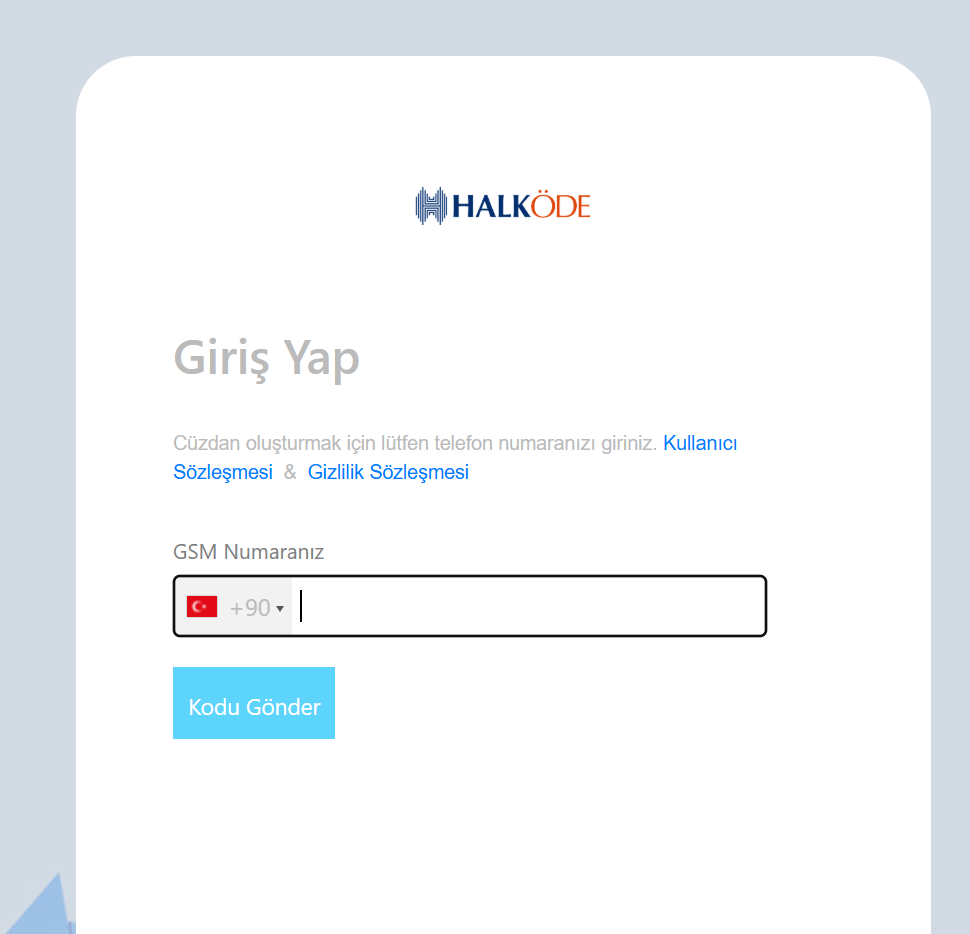
Oluşturulan ödeme linkine gidildiğinde müşteri, aşağıdaki görselde bulunan sayfaya yönlendirilir ve bu sayfaya telefon numarası girilir.
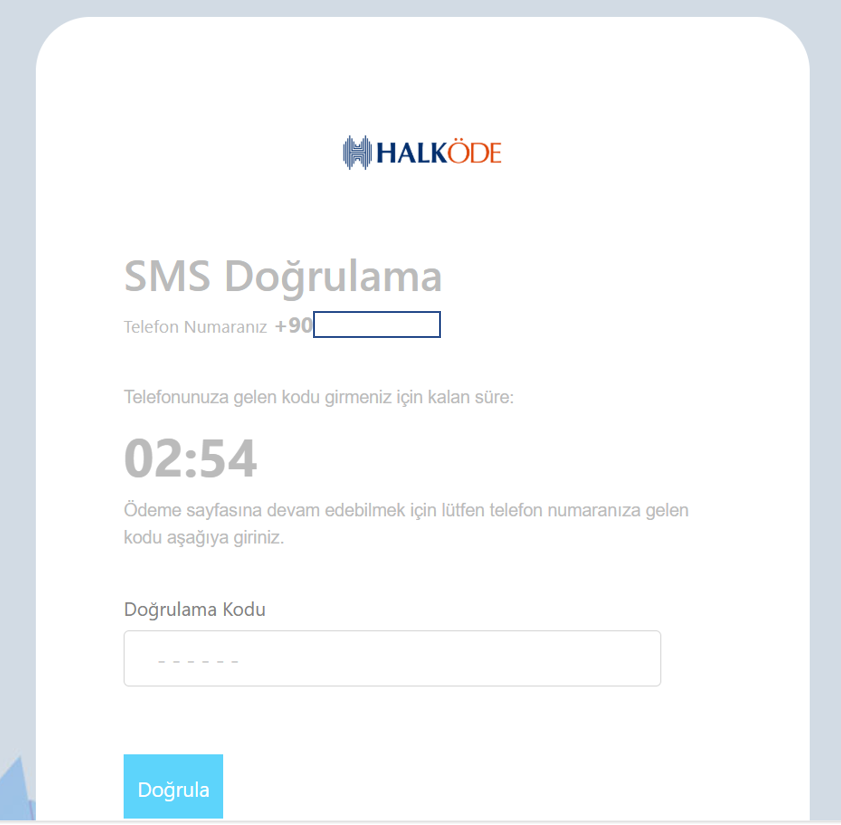
Girilen telefon numarasına gelen doğrulama kodu aşağıdaki görselde ilgili alana yazılır ve 'Doğrula' butonuna basılır.
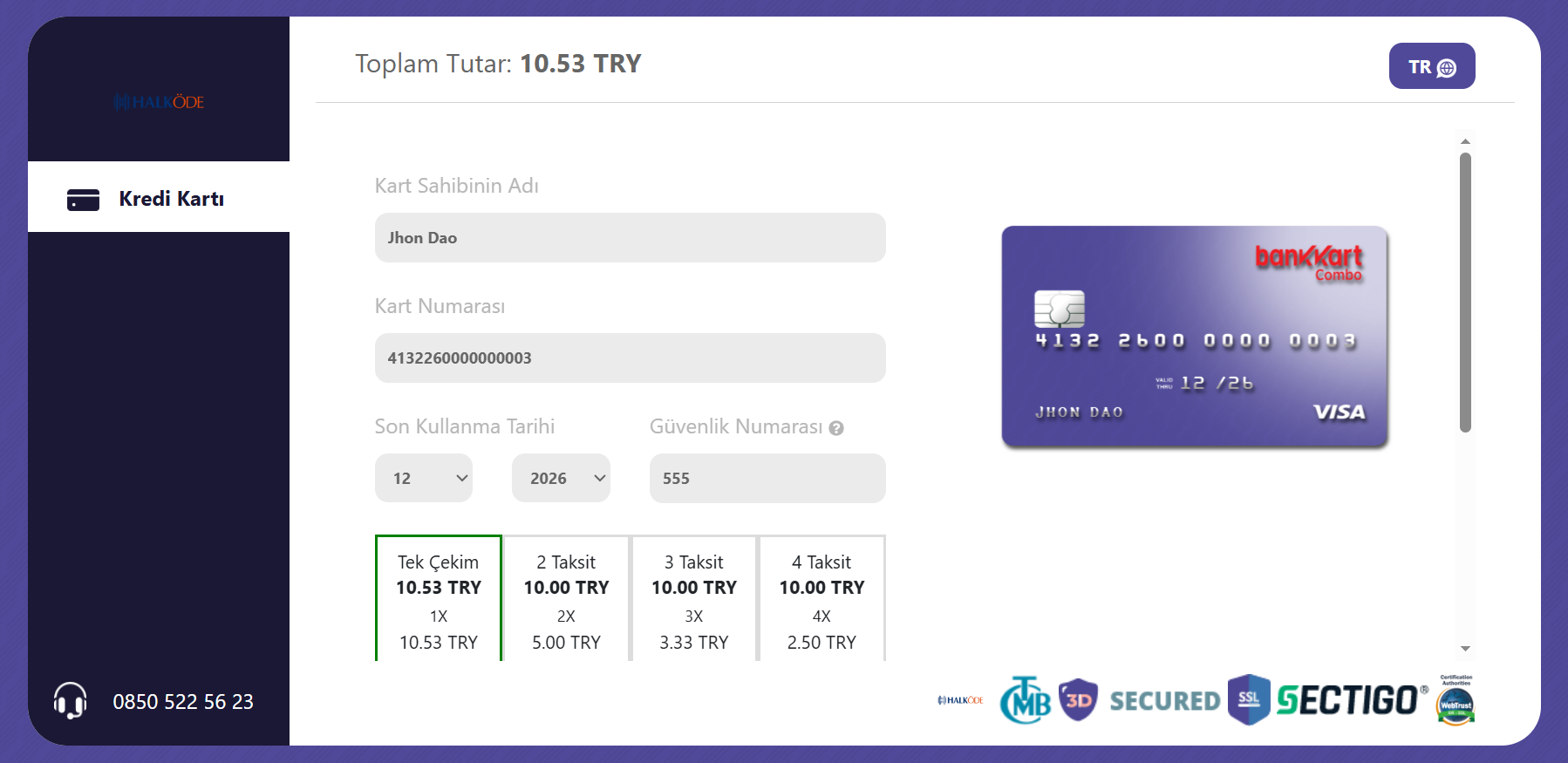
Müşteri, SMS doğrulaması adımını geçtikten sonra kart bilgilerinin girileceği aşağıdaki ekrana yönlendirilir. Bu ekran üzerinden ad, soyad, kart numarası, kartın son kullanma tarihi ve güvenlik numarası bilgileri girildikten sonra karta ait taksit bilgileri gözükür. Buradan taksit seçeneği seçilerek ilerlenir ve müşteri 3D doğrulama ekranına yönlendirilir.
Kod Örnekleri
PHP Örnek Kodu
<?php

if ($_SERVER["REQUEST_METHOD"] == "POST") {

    $apiUrl = "https://staging.halkode.com.tr/ccpayment/purchase/link";
    $invoice_id = $_POST['invoice_id'];
    $currency_code = "TRY";
    $name = $_POST['name'];
    $surname = $_POST['surname'];
    $total = $_POST['total'];

    $requestData = [
        "merchant_key" => $merchantKey,
        "currency_code" => $currency_code,
        "invoice" => "{\"invoice_id\":\"$invoice_id\",\"invoice_description\":\"Testdescription\",\"total\":$total,\"return_url\":\"https://google.com.tr\",\"cancel_url\":\"https://github.com.tr\",\"items\":[{\"name\":\"Item1\",\"price\":$total,\"quantity\":1,\"description\":\"Test\"}]}",
        "name" => $name,
        "surname" => $surname
    ];

    $ch = curl_init();
    curl_setopt($ch, CURLOPT_RETURNTRANSFER, true);
    curl_setopt($ch, CURLOPT_URL, $apiUrl);
    curl_setopt($ch, CURLOPT_POST, true);
    curl_setopt($ch, CURLOPT_SSL_VERIFYHOST, false);
    curl_setopt($ch, CURLOPT_SSL_VERIFYPEER, false);
    curl_setopt($ch, CURLOPT_POSTFIELDS, http_build_query($requestData));

    $response = curl_exec($ch);

    if (curl_errno($ch)) {
        $error_message = 'cURL Error: ' . curl_error($ch);
        curl_close($ch);
        exit($error_message);
    }

    curl_close($ch);

    $responseData = json_decode($response, true);
}
?>
C# /.NET Örnek Kodu
using System.Text;
using System.Text.Json;
using System.Net.Http.Headers;

public class PurchaseLinkController : Controller
{
    private const string URL = "purchase/link";
    private readonly HttpClient _httpClient;
    private readonly ApiSettings _apiSettings;
    public PurchaseLinkController()
    {
        _httpClient = new HttpClient();
        _apiSettings = new ApiSettingConfiguration().Configuration();
    }
    public IActionResult Index()
    {
        return View();
    }
    [HttpPost]
    public async Task<IActionResult> ProcessPayment(ApiSettings apiSettings, string name, string surname, double total)
    {
        var invoice_id = InvoiceGenerator.GenerateInvoiceId();
        var return_url = Url.Action("Index", "Succes", null, Request.Scheme);
        var requestData = new Dictionary<string, string>

        {
            { "merchant_key", _apiSettings.MerchantKey },
            { "currency_code", "TRY" },
            { "invoice", $"{{\"invoice_id\":\"{invoice_id}\",\"invoice_description\":\"Testdescription\",\"total\":{total},\"return_url\":\"https://www.google.com\",\"cancel_url\":\"https://github.com.tr\",\"items\":[{{\"name\":\"Item1\",\"price\":{total},\"quantity\":1,\"description\":\"Test\"}}]}}" },
            { "name", name },
            { "surname", surname }
        };
        using (var client = new HttpClient())
        {
            var content = new FormUrlEncodedContent(requestData);
            var response = await client.PostAsync($"{_apiSettings.BaseAddress}{URL}", content);
            var responseString = await response.Content.ReadAsStringAsync();
            if (!response.IsSuccessStatusCode)
            {
                ViewBag.Error = $"Error: {response.ReasonPhrase}";
                return View("Index");
            }
            var responseData = JsonSerializer.Deserialize<Dictionary<string, object>>(responseString);
            ViewBag.RequestData = requestData;
            ViewBag.ResponseData = responseData;
        }
        return View("Index");
    }
}
JavaScript / NodeJs Örnek Kodu
async function createInvoiceRequest(merchantKey, currencyCode, invoiceId, total, name, surname) {
    const apiUrl = "https://staging.halkode.com.tr/ccpayment/purchase/link";

    // 1. İç taraftaki "invoice" objesini hazırla
    const invoiceDetails = {
        invoice_id: invoiceId,
        invoice_description: "Test description",
        total: total,
        return_url: "https://google.com.tr",
        cancel_url: "https://github.com.tr",
        items: [
            {
                name: "Item1",
                price: total,
                quantity: 1,
                description: "Test"
            }
        ]
    };

    // 2. Ana REQUEST objesini oluştur
    const requestData = {
        merchant_key: merchantKey,
        currency_code: currencyCode,

        invoice: JSON.stringify(invoiceDetails),
        name: name,
        surname: surname
    };

    console.log("İstek Gönderiliyor:", requestData);

    try {
        // 3. API'ye POST İsteği Gönder
        const response = await fetch(apiUrl, {
            method: 'POST',
            headers: {
                'Content-Type': 'application/json'
            },
            body: JSON.stringify(requestData)
        });

        // 4. RESPONSE (Yanıt) İşleme
        if (!response.ok) {
            throw new Error(`Sunucu hatası: ${response.status}`);
        }

        const result = await response.json();
        console.log("Sunucu Yanıtı:", result);

        // Başarı kontrolü örneği
        if (result.status_code === 100) {
            console.log(" Fatura başarıyla oluşturuldu.");
        }

        return result;

    } catch (error) {
        console.error("Hata:", error.message);
    }
}

// Kullanım Örneği:
createInvoiceRequest(
    "MS_123456",
    "TRY",
    "INV-999",
    150.50,
    "Ahmet",
    "Yılmaz"
);
Komisyon Parametreleri (is_comission_from_user)
invoice nesnesi içerisinde gönderilen bu parametreler, POS komisyonunun müşteriye mi yoksa üye işyerine mi yansıtılacağını belirler.
Parametre Tanımları
| Parametre | Tür / Format | Açıklama |
|---|---|---|
is_comission_from_user | Integer (invoice içinde) | Komisyonun kime yansıtılacağını belirler. |
commission_for_installment | String (invoice içinde) | Komisyonun yansıtılacağı taksit listesi (is_comission_from_user: 1 iken zorunlu). |
is_comission_from_user Değerleri
1(Müşteriye Yansır): Üye işyeri POS komisyonu ters hesaplama (reverse) yöntemiyle tutara eklenir. Müşteri ürün tutarından fazla ödeme yapar.2(Müşteriye Yansımaz): Müşteri yalnızca ürün tutarını öder. POS komisyonu üye işyeri hakedişinden kesilir.0veya Gönderilmez (Varsayılan): Eski akış geçerli olur ve POS'taki son kullanıcı komisyonu müşteriye eklenir.
Önemli Not:
1ile0değerleri aynı mantıkla çalışmaz.
commission_for_installment Çalışma Mantığı
- Format: Virgülle ayrılmış string (
"1,2,3,4,5,6,7,8,9,10,11,12") - Davranış: Liste içindeki taksitlerde komisyon müşteriye yansıtılır (
1mantığı); liste dışında kalan taksitlerde ise komisyon üye işyerinden kesilir (2mantığı).
Örnek İstek Payload'ları
A) Komisyonun Müşteriye Yansıtılması (is_comission_from_user: 1)
{
  "merchant_key": "{{merchant_key}}",
  "currency_code": "TRY",
  "name": "John",
  "surname": "Dao",
  "invoice": "{\"invoice_id\":\"{{invoice_id}}\",\"invoice_description\":\"Test description\",\"total\":100,\"return_url\":\"http://localhost:8080/dplReturnUrl\",\"cancel_url\":\"http://localhost:8080/dplReturnUrl\",\"is_comission_from_user\":1,\"commission_for_installment\":\"1,2,3,4,5,6,7,8,9,10,11,12\",\"items\":[{\"name\":\"Item1\",\"price\":100,\"quantity\":1,\"description\":\"Test\"}]}"
}
B) Komisyonun Müşteriye Yansıtılmaması (is_comission_from_user: 2)
Üye işyerinin üstlendiği senaryolarda
is_comission_from_user: 2gönderilmesi yeterlidir.commission_for_installmentparametresine gerek yoktur.
{
  "merchant_key": "{{merchant_key}}",
  "currency_code": "TRY",
  "name": "John",
  "surname": "Dao",
  "invoice": "{\"invoice_id\":\"{{invoice_id}}\",\"invoice_description\":\"Test description\",\"total\":100,\"return_url\":\"http://localhost:8080/dplReturnUrl\",\"cancel_url\":\"http://localhost:8080/dplReturnUrl\",\"is_comission_from_user\":2,\"items\":[{\"name\":\"Item1\",\"price\":100,\"quantity\":1,\"description\":\"Test\"}]}"
}
Hesaplama Örneği
Varsayım: İşlem tutarı 100 TL, POS üye işyeri komisyon oranı %3
| Senaryo | Müşterinin Ödediği Tutar | Müşteri Komisyonu | Üye İşyeri Durumu |
|---|---|---|---|
is_comission_from_user: 1 | ~103,09 TL | ~3,09 TL | Komisyon müşteriden tahsil edilir |
is_comission_from_user: 2 | 100,00 TL | 0,00 TL | Komisyon hakedişten kesilir |